February 17, 2026
Lasercube Ultra MK2 Review – Major Laser?

It’s quite possible that when you think about lasers in a DJ context, you only think of the kind of beam shows seen in large clubs and festivals. And whils...


It can happen to anyone: one minute you’re at Starbucks organizing Bieber mashups and the next you’re anxiously sopping up a caramel macchiato from the keyboard, praying to the electronic gods to spare your precious MacBook Pro. But no luck; the screen is flickering, the mouse is unresponsive and the worst part: you didn’t backup your library. This might seem like a pitfall that most veteran DJs would avoid, but many of us don’t backup our library on a regular basis, if at all.
During his recent guest set on the MikiDz Show, Fourcolorzack described an incident in which he was hanging out before a gig and couldn’t find his DJ bag. “I thought somebody stole my backpack and they didn’t, so that was the highlight of my night…finding out that I still have a career.” We asked him, “But you have it all backed up somewhere else?” Zack replied, “I didn’t. But I will when I get home, I tell you that!”
 Richie Hawtin’s hard drive disaster at Coachella
Other DJs aren’t so lucky. In another instance of technological turmoil, acclaimed house DJ Ritchie Hawtin was scheduled to perform at Coachella but his laptop failed just hours before showtime. He told his Instagram followers, “Unfortunately the technology that is the foundation of my career is not playing friendly today! So due to corrupt hard drive #1 and broken pins on hard drive #2, I’m not able to perform tonight at Coachella. Apologies and see you all next week!”
So why don’t more DJs protect their libraries with all the advancements in digital file management, cloud archiving and security backup?
There’s no good answer! Some are too lazy, others cocky. Regardless of the reason, you should start backing up your library before it’s too late. Here’s some resources to help you get started:
Time Machine / External Backups
 Apple’s Time Machine is included with Mac OS X
For Mac users, Apple has made the process very easy and I’m regularly surprised when I meet DJs who don’t use Time Machine. The free utility is included with Mac OS X and creates incremental backups that can be restored through an external hard drive. Time Machine enables the user to restore the whole system or specific files via snapshots that are periodically taken and organized by date.
With Time Machine’s settings, users can have their files automatically backed up on schedule or whenever the designated external drive is connected which is convenient for those who are very busy.
Here’s the caveat though – Time Machine requires an external hard drive so you’re sh*t outta luck if the drive goes bad or missing. We recommend spending a few extra dollars on a hard drive with a solid reputation. Here’s some recommendations.
So what happens if the drive does go bad or missing? To prepare for this, we recommend additionally backing up to the cloud.
The Cloud / Online Backup
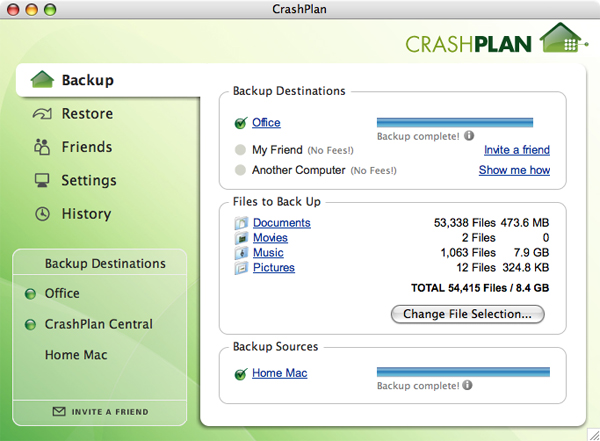 CrashPlan’s backup software used by DJcity
“The Cloud” refers to any kind of online backup or storage service. Cloud backup is similar to traditional backup services except your data is transferred and stored via the Internet on secure and professional severs. This is the most comprehensive method to backup your library and ensure that even if your computer and external HD are lost or damaged, you still have a backup that’s easily accessible.
There are many companies that offer cloud backup services. At DJcity, we use a service called CrashPlan+. We like CrashPlan+ because it has a simple user interface and features solid backup options including a web-based restore option, continuous backup and multiple destination support (your data can be backed up to the CrashPlan Central cloud, an external drive, securely to a friend’s computer, or all three for maximum protection). They also offer multiple payment and storage options and have valuable discount pricing for prepaid terms.
For a more comprehensive list of online backup services, read this article.
Whether external hard drives, cloud or both, make sure you choose a backup solution! As a DJ, there’s nothing worse than losing all of your favorite tracks and playlists.
Suggestions? Comments? Leave your feedback below and let us know what services/tools you prefer.
It’s quite possible that when you think about lasers in a DJ context, you only think of the kind of beam shows seen in large clubs and festivals. And whils...
Valentine’s Day gigs coming up? We made it easy. DJcity just dropped three themed playlists to help you lock in the right vibe, no matter the crowd. R&...

This week on @RoadPodcast features an in-depth conversation with The @StereotypesTV (@JonYip + @JermBeats + @RayRomulus), charting their rise from interns...
Notable tracks that were added to DJcity this week. Download them all here. Download the tracks below. (* indicates DJcity Exclusive) I Just Might - Austi...

Wiz Khalifa has dropped a visual for his single "Bake Sale" featuring Travis Scott. The song was recently included in DJcity's list of weed-friendly...

*** UPDATE: check out our updated 2024 and 2025 playlists! Wedding season has arrived! DJcity’s Remix Director Sir Marcus has put together a list of...
Pioneer DJ has introduced the DDJ-SZ2, a new four-channel controller that adds dedicated controls for Serato DJ's latest features. DJcity's Mojaxx says, "W...
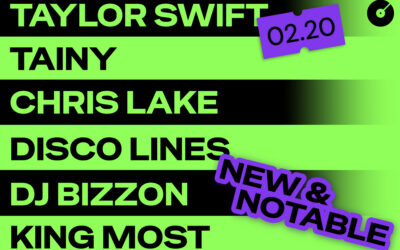
This week's notable adds on DJcity to power your weekend DJ sets 🔥 👉 Download all 10 tracks here. This week's picks include: (* indicates DJcity Exclusive)...

🚨 DJcity's 2025 Black Friday Sale is Here DJcity just dropped its biggest deal of the year! For a limited time, you’ll get two extra months free when you s...
Global superstar Bad Bunny is set to take over the halftime show this weekend - make sure your sets hit just as hard. This year's game-ready playlist round...