
rekordbox
Pro Tips for CDJs and rekordbox (Part 1)

Pioneer CDJs are increasingly becoming the standard in venues around the world and all working DJs should have a solid understanding of their features.
In the video above, DJcityTV’s Mojaxx gives four tips for making the most out of a CDJ and rekordbox setup, including instant doubles, single play mode, automatic loading, and active loops. Most of the tips are for the Nexus line of players and are particularly useful to laptop DJs who are new to the rekordbox ecosystem.
Related: How to Mix Harmonically on Pioneer CDJs
Interview with Rekord Buddy Creator Damien Sirkis

Rekord Buddy is a software application that helps DJs sync their music libraries between Traktor and rekordbox. The next version, which is expected to be released sometime this year, will add much-needed support for Serato DJ.
DJcityTV’s Mojaxx spoke with Damien Sirkis from Next Audio Labs, the company that makes Rekord Buddy, to find out what to expect from version 2.0 and why it’s taking so long to finish. The interview was filmed at the legendary DJWORX lab in Yorkshire, England.
Related: New Video Explores The Evolution of EDM and How Technology Has Changed the Role of DJs
New Video Explores The Evolution of EDM and How Technology Has Changed the Role of DJs

Pioneer DJ has released a video that explores the evolution of electronic dance music and how technology has changed the role of DJs. It is the third and final part of a documentary series about the company’s history.
The sixteen-minute piece features commentary from veterans such as Laidback Luke, DJ Jazzy Jeff, Carl Cox, Roger Sanchez, DJ Shadow, Skream, and Paul Oakenfold.
Topics discussed include the early days of DJing, the transition from vinyl to digital, how rekordbox improved the CDJ experience, and the blurring of the lines between DJing and producing.
We also recommend checking out the first and second parts of the series, which look at the evolution of Pioneer’s CDJ line and its various mixers. Watch them here and here.
Related: Quick Tips for Using Effects with Pioneer DJM Mixers
The Ultimate USB Backup Solution

If you’re a DJ and getting paid to play, then dead air is a crime. For this episode of “Tips & Tricks,” DJcityTV’s tech guru Mojaxx explains how to backup your sets with USB drives to ensure that you can still perform, even if your laptop stops working. Mojaxx’s simple solution requires only two USB drives, rekordbox, and either Serato DJ or Scratch Live. The technique explained in this video can also be applied to Traktor.
Related: The Biggest DJ Tech Announcements at NAMM 2015
Popular
-
October 13, 2026
Top Halloween Edits & Remixes of 2026
SPOOKIFY YOUR SETS Prepare your crates for the biggest party weekend of the year with the ultimate Halloween playlist from DJcity’s in-house production tea...
-
October 21, 2026
Technics SL-1210MKX: WORLD EXCLUSIVE First Look
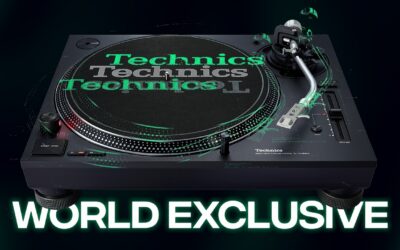
This year is the 55th anniversary of the 1200, and so it’s fitting that the company are launching a new model - the SL-1210MKX, which has been desig...
-
October 19, 2026
Serato fooled us all… The REAL 5.0 is Serato DJ for the iPhone and the iPad
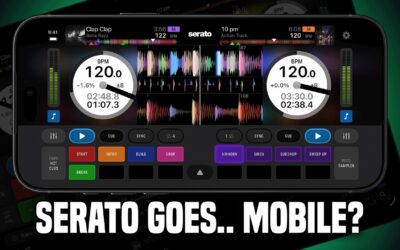
The public beta of Serato DJ Pro 5.0 seemed a touch underwhelming, considering the major version number. But it turns out, the real star of this rel...
-
October 26, 2026
R.O.A.D. Podcast – Flavor Of The Month (October 2026) Halloween Edition

ROAD PODCAST // #FOTM VOL. 10-26 FLAVOR OF THE MONTH Your plug for the hottest new DJ edits, remixes, and bootlegs - handpicked by the ROAD Podcast crew. T...
-
October 26, 2026
October 2026 Charts: Top Downloads By Region 📈

October 2026 Download Charts DJcity's monthly charts highlight the most popular tracks globally alongside regional breakdowns across key markets. Select a...
-
October 30, 2026
🆕 Must-Play Tracks by Cardi B, 21 Savage, Young Nudy + more

This week's notable adds on DJcity to power your weekend DJ sets 🔥 Download All Tracks This Week's Picks 01 LATIN COSITA Daddy Yankee & Cardi B 02 DANC...
-
August 2, 2026
DJcity Summer Sale 2026: Get 2 Months for $10 (Use Code SUMMER26)
News • Summer Sale 2026 🚨 Summer Sale ON NOW: Get 2 Months for $10 UPDATE: THIS PROMO HAS ENDED. Summer is in full swing. Make sure your crates are loaded...
-
October 15, 2026
Less Weight, More Freedom? Testing The AlphaTheta HDJ-F9 Wireless Headphones

AlphaTheta’s first headphones to feature their Sonic Link low-latency wireless technology, the HDJ-F10, were definitely not for everyone, as one of...
-
September 29, 2026
The Space Jam DJ Challenge Is Here 🚀

The Space Jam DJ Challenge Is Here: 30 Years Later, It’s Your Turn to Flip It It’s been 30 years since Space Jam hit theaters, and the iconic “Space Jam” t...
-
October 22, 2026
R.O.A.D. Podcast – DJ MISS MILAN: The Fairy Vibe Mother Behind Doechii’s Live Show
@DJMissMilan joins @ROADPodcast for an unfiltered conversation about the realities of modern DJing, building a career from the ground up, and comman...